
Dejavoo
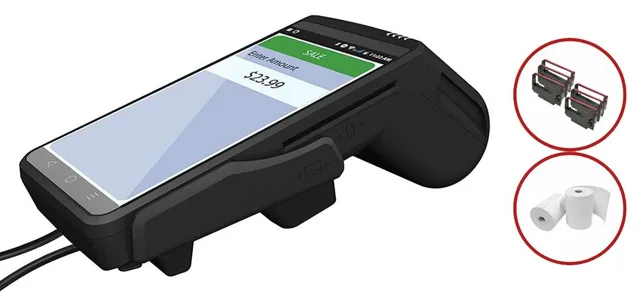
Dejavoo QD4
Android countertop
An Android countertop with a touchscreen, an internal PIN pad and contactless built in, on Ethernet or Wi-Fi.
Ask about this setupAll three make reliable countertop terminals that take chip, tap and swipe. The differences are in the lineup: Android options, wireless models, EBT, customer-facing PIN pads and how each handles dual pricing. Here is a fair side-by-side from a team that sets up all three.

By Josh Elsass, PresidentLast reviewed November 16, 2026
These are the models we set up today. Every one takes chip, tap and swipe, and runs on your own merchant account.
| Dejavoo | Valor PayTech | First Data | |
|---|---|---|---|
| Countertop models | Z8, Z11, QD4, P1 | VL100 Pro, VP100, VP550 | FD150 |
| Wireless models | P3 handheld, QD2 with 4G | VL110 on Wi-Fi or cellular | Countertop focus |
| Android terminals | QD4, P1, P3, QD2 | VP550 | No |
| Built-in printer | Z8, Z11, P1, P3, QD2 | VP100 | FD150 |
| Customer-facing PIN entry | QD4 has an internal PIN pad | On the device | RP10 PIN pad pairs with the FD150 |
| EBT called out by the maker | Ask us by model | VL100 Pro, VP550, VL110 | Ask us by model |
| Dual pricing and cash discount | Supported on QD2, QD4, Z8, Z11 and more | Supported on VL100, VL110, VP100, VP550 | Depends on the platform setup |
| Best known for | Wide range, from keypad to Android | EBT and fee-offset programs | The FD150 and RP10 pairing on Fiserv |
Model features come from each maker. Dual pricing support by model is from the Paysafe device list in the sources below. Software features change, so we confirm the exact model and setup for your business before you buy.
Dejavoo
Keypad models for simple counters, Android touchscreens for tips and menus, and handhelds for pay-at-table or the curb, all from one maker.
Valor PayTech
Valor calls out EBT on several models and is widely used for dual pricing and cash discount programs. The VL110 adds an all-day wireless option.
First Data
The FD150 with an RP10 PIN pad lets customers tap, dip or enter a PIN on their side of the counter. A common fit for retail and front desks.
Dejavoo
Android countertop
An Android countertop with a touchscreen, an internal PIN pad and contactless built in, on Ethernet or Wi-Fi.
Ask about this setup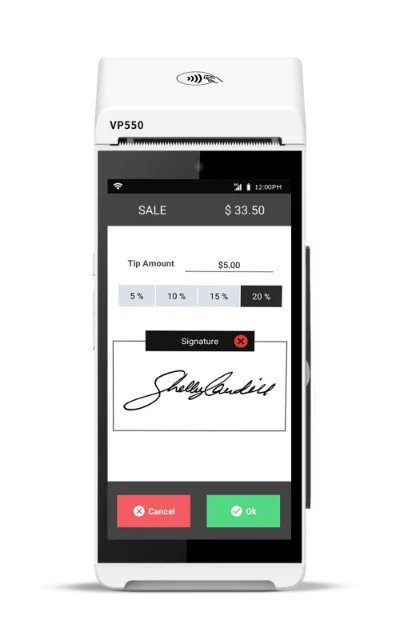
Valor PayTech
Android terminal
An Android terminal with chip, tap, swipe and EBT. The countertop version lets the customer pick card, EBT or cash on screen.
Ask about this setup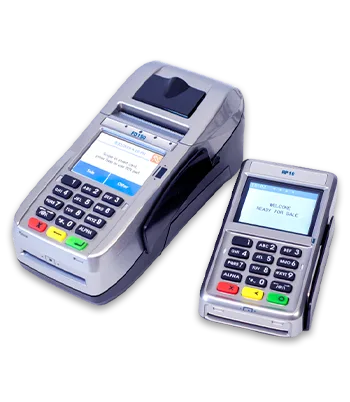
First Data
Countertop terminal
A countertop terminal with PIN debit, gift cards and a built-in printer. Pairs with the RP10 PIN pad.
Ask about this setupSee every model in our terminal catalog, or compare full POS systems in Clover vs Square vs Genius.
Send one statement
Upload a recent processing statement, or tell us how your business takes payments today if you're just starting.
Get your audit and a setup
We explain every line you pay now, then match the hardware, software and pricing to how you actually sell. No pressure to switch.
Go live with backup
We configure your equipment before it ships, so you plug it in and sell. When you call, a person picks up fast.
Neither is better for everyone. Dejavoo has a wider range of form factors. Valor calls out EBT on more models and is popular for dual pricing. Your card mix and counter setup decide it.
Sometimes. Many terminals can be set up for a new processor, but some are locked to the company that sold them. Tell us the model and we will check.
Many Dejavoo and Valor models support dual pricing and cash discount programs. For First Data, it depends on the platform. We confirm before you buy.
If you only need to take cards, a terminal is simpler and costs less. If you need inventory, menus, tables or staff reports, look at a POS system.
About the author
Josh Elsass
President, PayVault Solutions
Josh Elsass is President of PayVault Solutions, where he leads merchant sales and the agent and ISO partner channel. A payments executive with more than two decades of sales leadership in payment processing and business financing, he has worked with thousands of small businesses and enterprises nationwide and has been part of three successful company exits, building the sales channel behind each one. Before PayVault, he served as Chief Sales Officer and then President, Operating Companies at Simpay, where he strengthened every sales channel and oversaw day-to-day operations. Josh has built his career on one conviction: the best companies value clients, partners and employees equally. At PayVault, that means pricing explained line by line for every merchant and terms in writing for every sales partner.
Connect with Josh on LinkedInStill deciding?
Send one statement and a line about your counter. We match the terminal to your card mix, not a quota.
Help me pick