
Phone and invoice payments
NMI Virtual Terminal
Phone and mail orders
Key in or swipe card payments from any browser, with refunds, eChecks and Level III data for business clients.
Ask about this setupLaw firms, accountants, consultants, dental and medical practices, therapists and veterinarians bill by invoice, take payments over the phone and see patients at a front desk. We set up one account that handles all three, with card data kept off your systems.
A real person picks up. No call trees, no AI, no 10-minute holds.

Receivables
Clients mean to pay. A paper invoice or a PDF with no pay button just makes it easy to forget.
Risk
Numbers written on intake forms or read over the phone create risk you do not need. Card data should be tokenized, not stored.
Fees
A $4,000 retainer on a rewards card is expensive to process, and keyed-in payments cost more than tapped ones.
| Need | How we handle it |
|---|---|
| Pay-by-link invoices | Invoices and text-to-pay with a one-click pay button, so clients pay from their phone |
| Phone payments | A browser-based virtual terminal for payments taken over the phone, with no card numbers written down |
| Front desk | A countertop terminal for in-person copays and visits, with tap, chip and PIN debit |
| Payment plans and retainers | Cards stored as tokens for scheduled payments, with automatic card updates to cut declines |
| Business clients | Level II and Level III data on commercial cards, which can qualify for lower interchange |
| Security | PCI DSS Level 1 platforms, encryption and tokenization (how we protect card data) |
Phone and invoice payments
Phone and mail orders
Key in or swipe card payments from any browser, with refunds, eChecks and Level III data for business clients.
Ask about this setupPlans and retainers
Subscriptions and card on file
Store cards securely as tokens and run scheduled payments, with automatic card updates so expired cards do not stop a payment plan.
Ask about this setup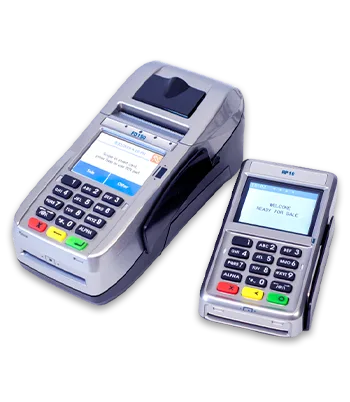
Front desk
Countertop terminal
A countertop terminal with PIN debit and a built-in printer. Pair it with the RP10 PIN pad so patients pay on their side of the desk.
Ask about this setupFor firms and practices, the biggest savings usually come from interchange-plus pricing, sending Level II or III data on business cards, and, where your state and your licensing rules allow, a compliant surcharge on credit, dual pricing or a cash discount.
Worked example
A professional office with $50,000 a month in card sales, paying the industry average of about 2.4% all-in.
Keep absorbing the fees
$1,200/month
$14,400 a year
$50,000 × 2.4% = $1,200 a month, out of your margin.
Surcharge credit cards
$420/month
$5,040 a year
Credit customers cover their own fee. Debit can't be surcharged, so the fee on the 35% paid by debit ($17,500) stays with you.
Dual pricing or cash discount
$0/month
$0 a year
The card price covers the fee on every card, including debit. Cash customers pay the lower price.
Rather keep one price? On interchange-plus pricing, every 0.25% we take off your rate saves about $125 a month ($1,500 a year) at this volume.
Example, not a quote. Industry average effective rate: 2.0%–2.8% for law, accounting, medical and dental offices; we use the middle of that range. Assumes about 35% of card sales on debit. Source: checkmyfees.com industry benchmarks. Your audit uses your real statement, and the rules for passing fees on depend on your state.
Card fees
Surcharge, dual pricing or cash discount? Check your state in 10 seconds.
Some professions have their own rules about passing fees to clients. Check your state first, then your licensing board or bar rules.
Check the rules for your stateSend one statement
Upload a recent processing statement, or tell us how your practice takes payments today if you're just starting.
Get your audit and a setup
We explain every line you pay now, then match the hardware, software and pricing to how you actually sell. No pressure to switch.
Go live with backup
We configure your equipment before it ships, so you plug it in and sell. When you call, a person picks up fast.
In most states a surcharge of up to 3% is allowed on credit cards, but never on debit, which includes HSA and FSA cards. Review any payer contracts first, then check your state.
Yes, if they go straight into a secure virtual terminal and are never written down. Stored cards are kept as tokens, so the real number is not on your systems.
Yes. Invoices and text-to-pay links include a pay button, and the payment posts with the rest of your deposits.
Tell us how your trust and operating accounts are set up. Payment setups for law firms usually need to deposit to the right account and keep fees out of trust, so we plan for that first.
For firms and practices
Send one statement. We explain every line and show you how invoices, phone payments and your front desk can run on one account.
Get my practice audit